Security Center
The Security Center (/security) is Walis's centralized security monitoring and policy management dashboard, designed for administrators to evaluate host security posture, audit privileged resources and network exceptions, mitigate brute-force lockout threats, and review security policies and audit trails.
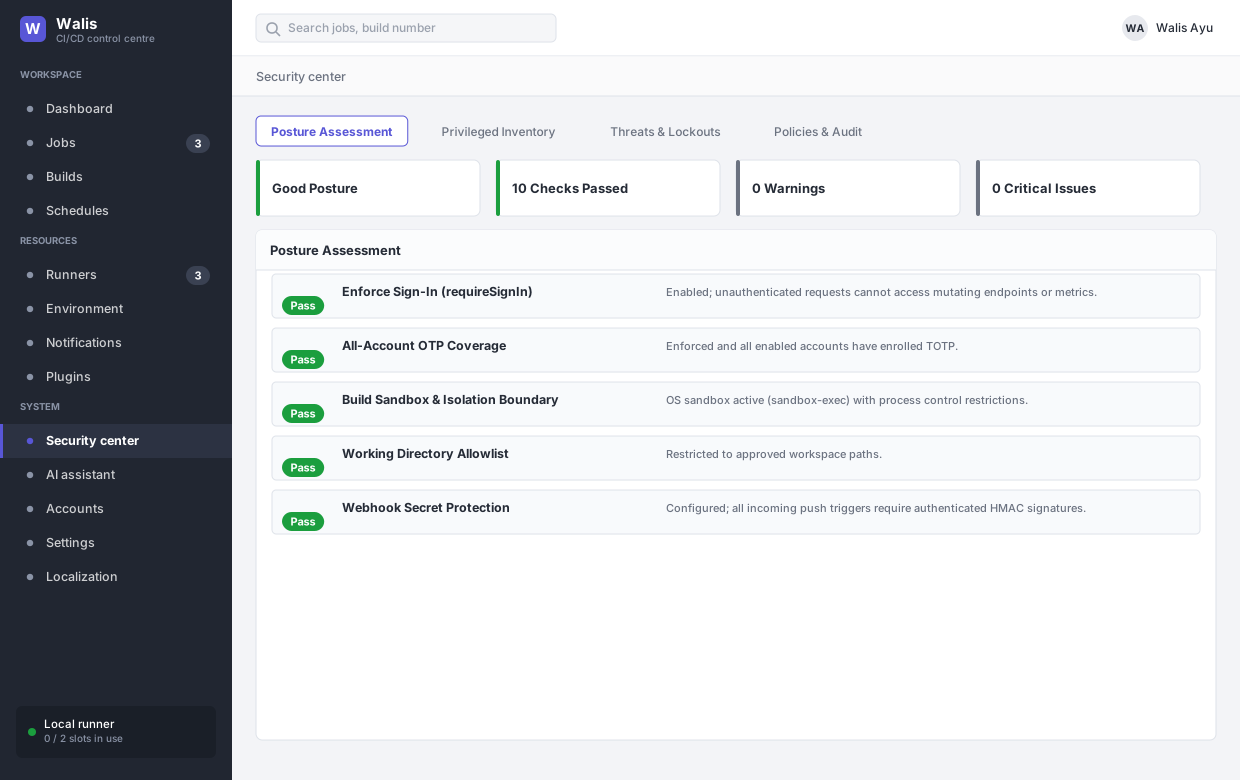
The Security Center is organized into four main tabs:
- Posture Assessment
- Privileged & Risk Inventory
- Threats & Lockout Management
- Security Policies & Audit Trail
Posture Assessment
The posture check evaluates the security standing of the Walis server in real time across ten essential dimensions, reporting an overall posture status (good, warn, or danger):
| Check Item | Severity | Description & Standard |
|---|---|---|
| Enforce Sign-In | High | Checks requireSignIn. If disabled, unauthenticated visitors can view sensitive configurations and trigger builds. |
| All-Account OTP Coverage | Medium | Checks whether requireOtp is enabled and all enabled accounts have registered two-factor authentication (TOTP). |
| Instant Security Alerts | Medium | Checks if notifyOnSecurityAlert is enabled and at least one notification channel (Webhook, Slack, Email) is active. |
| Build Sandbox & Isolation | High | Evaluates OS sandbox support (macOS sandbox-exec) or remote execution boundary settings. Warns if unisolated builds are permitted without acknowledged risk. |
| Working Directory Allowlist | Medium | Verifies that allowedWorkingDirectories is defined to confine builds within approved file trees. |
| Webhook Secret Protection | High | Checks whether push-triggered jobs exist and verifies that webhook signing secrets or tokens are configured. |
| MCP Firewall | Medium | Checks if mcpAllowedAddresses restricts AI Model Context Protocol connections to trusted IPs or CIDR blocks. |
| Backup Passphrase Protection | Medium | Verifies that automated backups have a configured passphrase (backupPassphrase) for AES-256 encryption. |
| Encryption Master Key | High | Verifies the origin of the primary symmetric key (Security:EncryptionKey) and warns if using an auto-generated file. |
| Stored Secret Decryption | Medium | Scans the database in real time to verify that all encrypted credentials and variables can be properly decrypted. |
Each check includes direct navigation links to the relevant configuration page, allowing administrators to address weaknesses immediately.
Privileged & Risk Inventory
Centrally audits high-privilege resources and network/isolation exceptions to enforce the principle of least privilege:
- Privileged or Unsandboxed Jobs: Lists jobs configured with
trustedUnsandboxed = true(exempt from sandboxing) ordenyNetwork = false(network access permitted). - Trusted Plugins: Lists plugins marked as trusted (
isTrusted = true). Only trusted plugins are permitted to access credentials and initiate external HTTP requests. Administrators can toggle trust directly. - Risky API Keys: Identifies API keys holding Administrator privileges, lacking IP restrictions (
allowedAddressesempty), missing expiration dates, or inactive for over 30 days. - Account Inventory: Audits all accounts, their assigned roles (Admin / Operator / Viewer), 2FA registration status, and last login timestamps.
- Runner Boundaries: Reviews isolation declarations and heartbeat statuses across local and remote build runners.
Threats & Lockout Management
Walis incorporates built-in brute-force protection, applying temporary lockout windows when repeated authentication failures occur:
- Active Lockout List: Displays currently locked accounts and remote IP addresses, along with failure counts and remaining lockout durations.
- One-Click Unlock: Allows administrators to immediately unlock accounts or IPs falsely flagged due to accidental password typos.
- 24-Hour Threat Metrics: Summarizes authentication failures, lockout events, credential reveals, and permission-denied events over the past 24 hours, alongside the 10 most recent security events.
Security Policies & Audit Trail
This tab combines real-time security policy editing with system-wide audit logging:
- Policy Quick Configuration: Directly adjust sign-in requirements, mandatory OTP, secret masking in build logs, and unisolated build allowances without restarting the service.
- Advanced Audit Trail:
- Automatically records user and system operations (creation, updates, deletions, executions, cancellations, exports, unlocks).
- Supports multi-attribute filtering by Actor, Entity Type, Action, and Outcome (Success / Denied / Failed) with pagination.
- Allows exporting full audit records to CSV for compliance and record-keeping.